

We see our customers as invited guests to a party, and we are the hosts. It’s our job every day to make every important aspect of the customer experience a little bit better.
Jeff Bezos, Founder at Amazon
For support teams, that “little bit better” is measured in hard metrics like lower call handling time, higher first call resolution, and fewer minutes wasted on after-call work. That’s where Salesforce CTI for customer support becomes non-negotiable. When CTI is built for service workflows, agents get instant screen pop, automated call logging to cases, and cleaner routing so every call pushes the ticket closer to resolution.
In this blog post, you’ll learn how CTI directly impacts call handling efficiency, speeds up ticket resolution inside Salesforce, and improves the support metrics leaders track most.
Learn how Salesforce telephony integration can make your customer support better in this blog post

Why Support Teams Need CTI in Salesforce
In most support orgs, the biggest drag is not talking time. It is the time around the call:
- Searching for the right contact or case
- Confirming identity and context again
- Routing to the wrong queue or agent
- Writing notes after the call and updating the case
When CTI is tightly integrated with Salesforce, the console becomes a single work surface for agents. That directly reduces after-call work (ACW) and improves handle-time efficiency.
How Salesforce CTI Improves Call Handling Efficiency
In support, call handling efficiency is not about rushing calls. It is about removing the friction that slows agents down, like searching for the right record, transferring calls unnecessarily, and spending extra minutes doing after call admin. Salesforce CTI helps by bringing context, routing, and logging into one flow so every call moves the case forward, faster and more consistently.
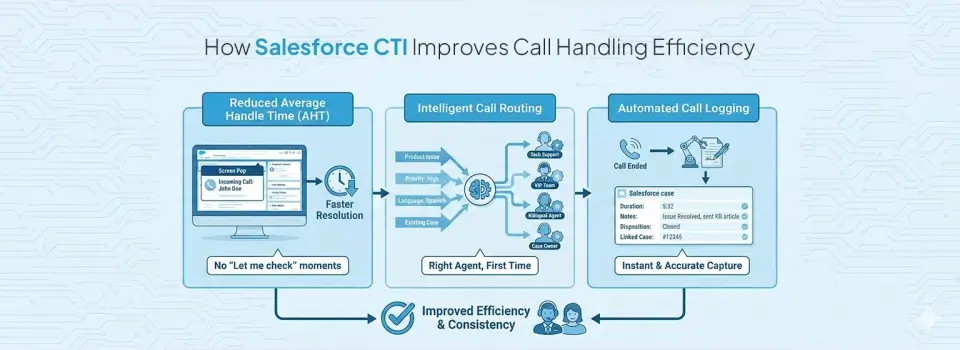
- Reduced Average Handle Time (AHT)
With screen pop customer support workflows, agents do not start calls blind. The moment the phone rings, Salesforce can open the right contact or case and show the context that matters, like case history, recent notes, open tickets, and SLA timers. That means fewer “let me check” moments and less time spent hunting across tabs. The call becomes a problem solving conversation, not a data search exercise, which directly reduces call handling time in Salesforce.
- Intelligent Call Routing
A big reason AHT climbs is misrouted calls. Customers land in the wrong queue, agents transfer, and the customer repeats the issue. With skills based routing, Salesforce CTI can send calls directly to the right team based on logic like product line, priority, language, customer tier, or even existing case status. This reduces transfers, lowers frustration, and gets customers to resolution faster because the first agent is more likely to be the right agent.
- Automated Call Logging
Support teams lose time after the call, not during it. Without automation, agents manually log activities, type notes, choose dispositions, and link calls to cases, which adds minutes to every interaction and creates gaps when queues are busy. Support call logging automation captures key call details like duration, notes, disposition, and the linked case automatically. This keeps case timelines clean, protects support agent productivity in Salesforce, and ensures supervisors can trust reporting because outcomes are consistently captured.
How Salesforce CTI Connects Calls to Cases for Faster Resolution
When support calls are not connected to Service Cloud, resolution slows down for one simple reason: the case workflow breaks. Agents spend time searching for the right case, logging notes later, and manually creating follow ups. With Salesforce CTI for customer support, voice becomes part of the case lifecycle, so every call moves the ticket forward with less effort and better data.
| What CTI Fixes in Support Workflows | What Changes Inside Service Cloud | Why It Improves Resolution |
| Calls not linked to the right case | Salesforce call center integration auto-attaches calls to the correct case in real time | Less searching, fewer mistakes, faster ticket progression |
| Incomplete case timelines | Call notes, outcomes, and recordings sit inside the case history | Agents and Tier 2 teams get full context instantly |
| Slow escalations | Escalations carry conversation context, not just a case summary | Escalations carry conversation context, not just a case summary |
| Follow ups missed or delayed | Call dispositions trigger tasks and next steps automatically | Cleaner execution and fewer tickets stuck in limbo |
| Duplicate cases and repeated issues | Better call to case linking keeps records consistent | Fewer duplicate tickets and less customer frustration |
| Low visibility for supervisors | Live activity and outcomes show up in dashboards consistently | Managers can intervene early and improve team performance |
The Resolution Metrics Salesforce CTI Improves in Support
When support leaders evaluate performance, they are not measuring how calls are routed or logged. They are measuring resolution speed, SLA adherence, and customer satisfaction. This is where Salesforce CTI for customer support creates measurable impact.
For Salesforce CTI support teams, improvements show up directly in service metrics, not just workflow convenience.
- First Call Resolution (FCR)
When agents receive contextual screen pop customer support data and complete call history instantly, they can solve issues during the first interaction instead of scheduling callbacks. This directly improves first call resolution in Salesforce, which reduces queue pressure and repeat contacts.
- Average Handle Time (AHT)
With automated logging and fewer transfers, agents spend less time searching, documenting, and correcting records. As a result, call handling time in Salesforce decreases without rushing conversations. The time saved comes from removing friction, not cutting quality.
- Ticket Resolution Time
Because calls are structured within the case workflow, cases move forward during the call, not after it. Follow-ups trigger faster, escalations move with context, and fewer cases sit idle. This shortens overall ticket resolution time and improves throughput.
- SLA Compliance
When calls automatically update cases in real time through Salesforce call center integration, SLA clocks reflect accurate activity. Managers gain visibility into aging cases earlier and can intervene before breaches happen.
- Support Agent Productivity
Reduced manual logging and cleaner workflows improve support agent productivity in Salesforce. Agents focus on solving problems rather than updating records. Over time, this improves morale and performance consistency.
- Customer Satisfaction (CSAT)
Customers notice when they do not need to repeat themselves. With structured CTI workflows and consistent omnichannel alignment through omnichannel support Salesforce CTI, conversations feel continuous rather than fragmented. That consistency lifts CSAT naturally.
Check out how 360 CTI can be an ally for your call centers

What to Look for in a Salesforce CTI for Support Teams
When evaluating Salesforce CTI for customer support, the requirements are different from sales-driven use cases. Support teams operate under SLA pressure, handle escalations daily, and depend on structured case data. The right CTI setup should directly improve call handling time in Salesforce, resolution speed, and reporting reliability inside Service Cloud. Here are the capabilities that matter most for Salesforce CTI support teams:
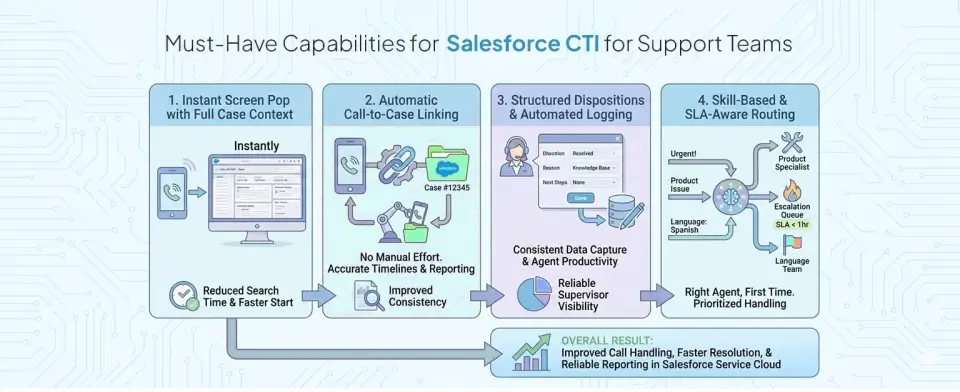
- Instant Screen Pop With Full Case Context
Support agents cannot afford to start calls without context. A strong CTI setup should trigger screen pop customer support workflows that automatically open the correct case or contact the moment the call connects. Agents should immediately see open cases, prior notes, SLA timers, and recent interactions across channels. This reduces time spent searching, shortens average handle time, and increases first call resolution in Salesforce because the conversation starts with full visibility.
- Automatic Call-to-Case Linking
For Salesforce CTI support teams, every call must attach to the correct case without manual effort. A reliable Salesforce call center integration automatically links inbound and outbound calls using phone matching, contact logic, or open-case detection. Without this, agents waste time locating case numbers and risk creating duplicate tickets. Automatic linking keeps case timelines accurate, improves reporting consistency, and ensures ticket resolution time decreases because updates happen in real time.
- Structured Dispositions and Support Call Logging Automation
Support performance depends on consistent call outcomes. The CTI system should enforce structured dispositions and enable support call logging automation so every interaction captures duration, outcome, and next steps inside the case record. When logging is automated, support agent productivity in Salesforce improves because agents spend less time documenting and more time resolving. It also strengthens supervisor visibility into real service metrics.
- Skill-Based and SLA-Aware Routing
Not all support calls should enter the same queue. Effective Salesforce CTI for customer support must support skill-based routing, priority logic, and SLA-aware distribution. Calls can route directly to product specialists, language-specific teams, or escalation queues based on case urgency.
The Bottom Line
Support is heading toward always-on expectations and tighter service benchmarks, so the next upgrade is not just more agents, it is better systems. Salesforce CTI for customer support becomes a strategic foundation when Salesforce call center integration is designed to scale context, governance, and measurable outcomes as volumes grow.